Turn a recording into a course people finish.
Bring a video. Pick a template from a library we build and keep adding to. The course then builds itself from what was actually said: the checks, the final exam and the certificate. You review it, publish it, then sell it or assign it.
Nothing publishes without your review.
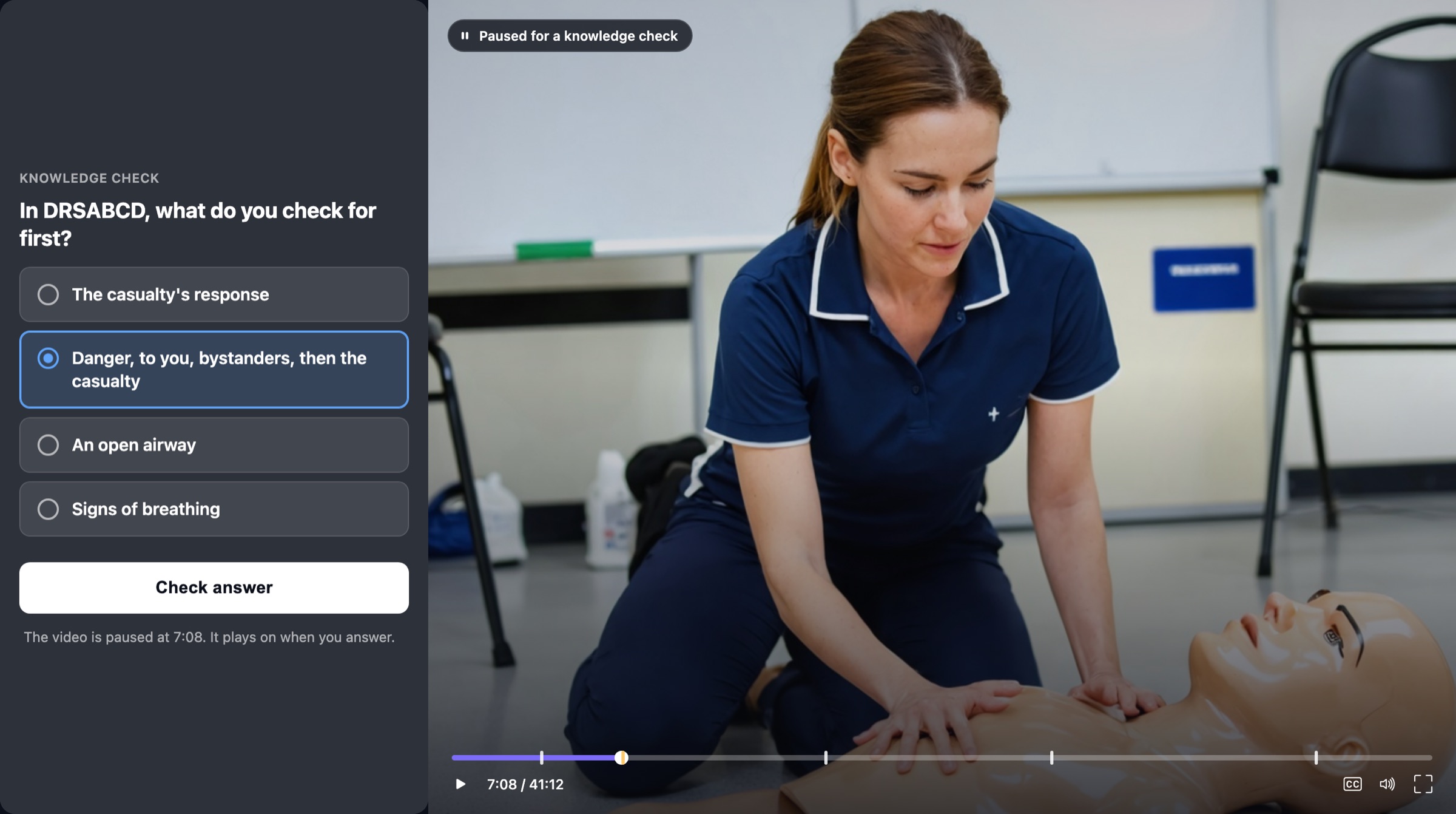
The finished course, paused on a check at the second the point was made.
Bring the video
Import it from your Zoom, upload a file, or record it in the app. If you ran the session here, it is already waiting.
Pick a template
Each one says what it builds. Try its sample course, answer the few questions it asks, and use it.
It builds itself
The recording is read, every part is written from what was said, and each lands on the timeline where it belongs. Then it is yours to check.
Bring the video
Starting a course from scratch means starting from a video. There are three main ways to bring one in, and two more.
- Import from Zoom. Pick any cloud recording from the Zoom account you connected.
- Upload. A webinar, a meeting, a workshop or a talk you already have on file.
- Record in the app. Record to camera in the browser, with a script to read from.
- A call you ran here. Your live session, already drafted into a replay when it ended.
- A link. Point at a video you host somewhere else.
Pick a template. We build them, you choose.
A template is the shape a course should take: which parts it has, how often a learner is asked something, and whether the final must be passed. We build the templates in house and the library keeps growing. You never have to design one.
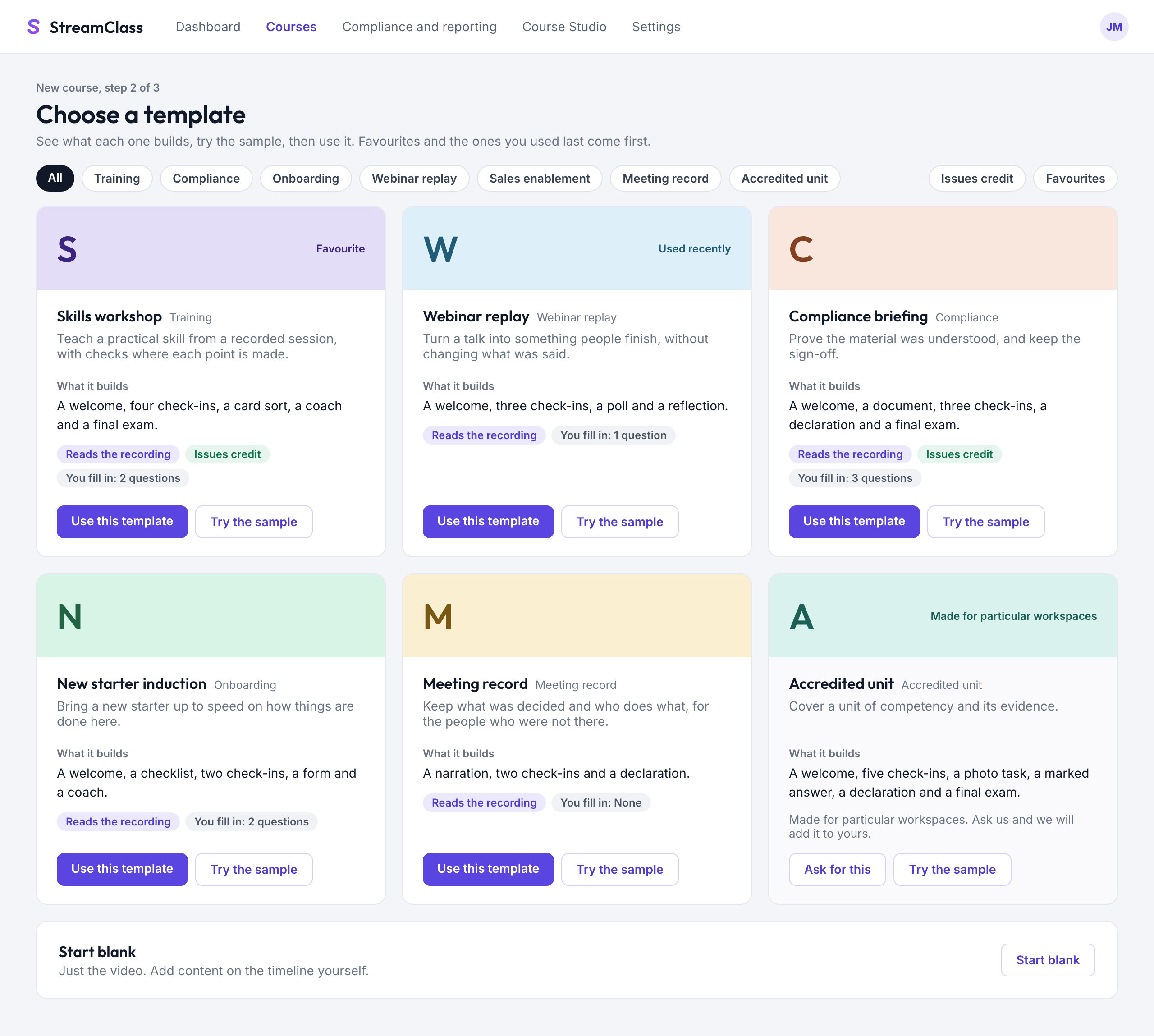
The template gallery. Every card says what it builds, and has a sample course you can play first.
- What it builds, in a sentence. "A welcome, four check-ins, a card sort, a coach and a final exam."
- Try the sample. Play a finished course made with it before you choose.
- What you fill in. A few questions at most. Some templates ask nothing.
- Reads the recording. The parts are written from the transcript, not from a bank of stock questions.
- Issues credit. Some templates set up the certificate and the credit for you.
- Need one that fits your organisation? Ask us, and we add it to your workspace.
- Or start blank. Just the video. Add content on the timeline yourself.
| Kinds of template | What it is for |
|---|---|
| Training | Teach a skill from a recording. |
| Compliance | Prove the material was understood. |
| Onboarding | Bring a new starter up to speed. |
| Webinar replay | Turn a talk into something people finish. |
| Sales enablement | Get a team ready to sell. |
| Meeting record | Keep what was decided and who does what. |
| Accredited unit | Cover a unit of competency and its evidence. |
Then it builds itself
The draft starts on its own once the recording has been read. You come back to a course, not a blank page.
- Every part is drafted from the recording and placed at the second it belongs
- Click any item to edit it, redraft it, move it or remove it
- Trim the start, the end, or a stretch in the middle of the video
- Change your mind about the template, and it asks before replacing your draft
- Try it as the learner without leaving the page, then publish from Launch
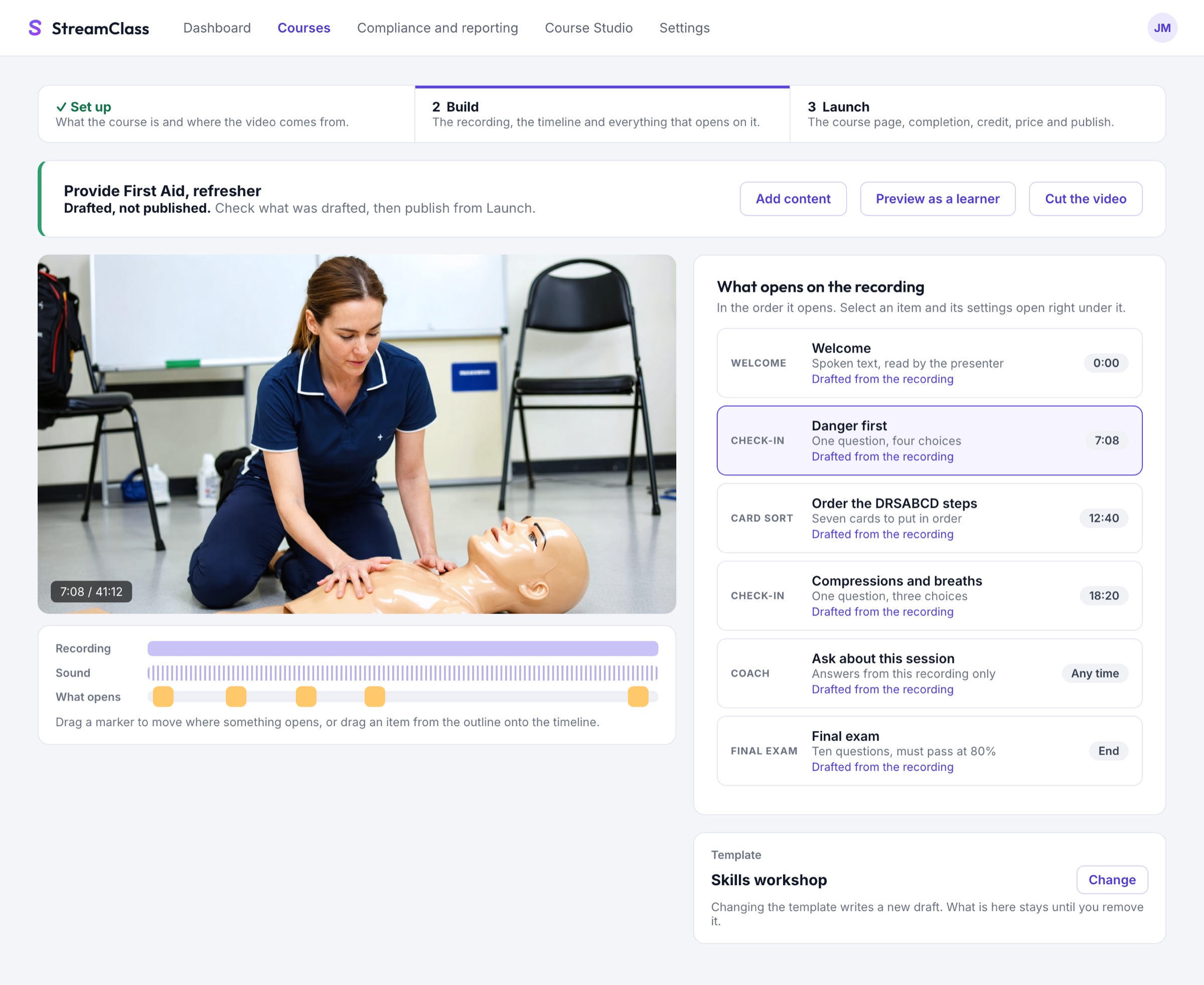
Build. The video and its timeline on the left, everything that opens on it on the right.
What a template can put in a course
Each of these opens at the second it belongs to. The template you pick decides which ones you get and how often a learner is asked something.
Welcome
A spoken greeting before the video starts, in the voice you choose.
Narration
Spoken text on the timeline, to set up a section or sum one up.
Check-in
A question at the second the point is made. Marked, with feedback that says why.
Spot the fake
Statements in the speaker's words. One has been changed.
Misconception probe
A check whose wrong answers are the mistakes people really make.
Card sort
Put the steps back in order, or sort the cards into the right piles.
Reflection
One line in the learner's own words, private to them and you.
Poll
One tap and no wrong answer. It tells you who is in the room.
Survey
A short rating scale, for confidence or feedback.
Checklist
Steps ticked while the video keeps playing. Each tick keeps its time.
Document
A policy or handout, opened at the right moment.
Declaration
Read it, acknowledge it, sign it. Kept as a record.
Form
Collect the details you need, such as an intake form.
Photo task
The learner photographs their work and sends it in.
Spoken answer
The learner answers out loud, and the recording is kept.
Upload
The learner uploads a file as evidence.
Marked answer
An answer in the learner's own words, marked against what was taught.
Coach
Answers the learner's questions from this recording only.
Practice partner
A roleplay, to practise the conversation before the real one.
Final exam
Must-pass questions at the end, before the certificate.
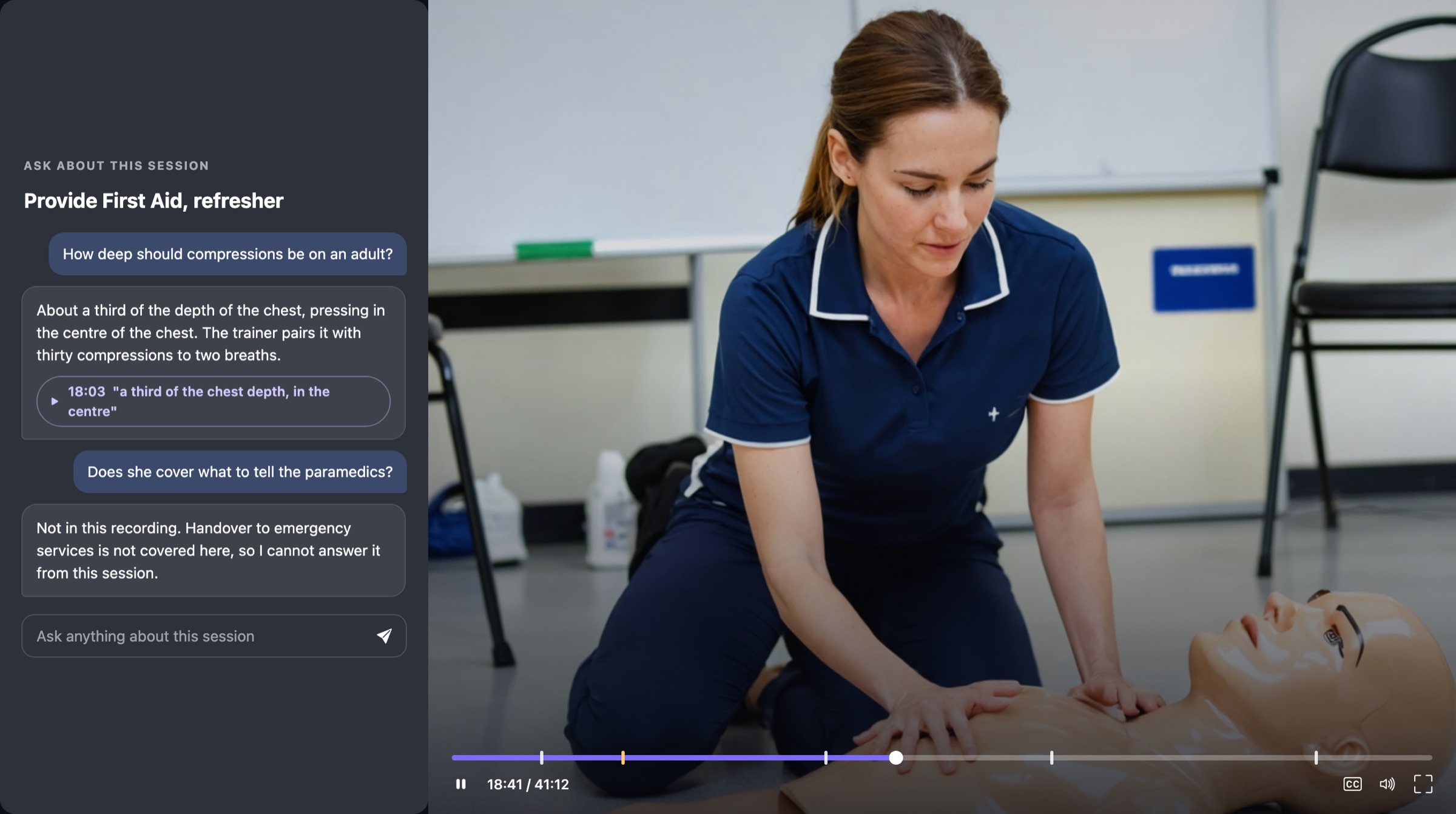
The coach beside the video. The second answer is the important one: it says when the recording does not cover something.
Ask, beside the video
Learners can ask anything, at any time, without stopping the video. The answer comes from this recording only.
- Each answer carries the moment it came from. One press plays it
- If the recording does not cover it, the coach says so
- You see what people ask, which tells you what to teach next
- The same Ask works during a live session, for you and for the room
The course sounds like the person who taught it
When a course greets the learner, asks a question or explains why an answer was wrong, it can speak in the voice of the presenter on the recording. One question in the builder: whose voice reads it?
The speaker gives consent first, on the record. No consent, no voice.
You are the seller. We are the checkout.
Payments go into your own Stripe account, so the customer relationship, the receipts and the payouts are yours. StreamClass keeps a 5% platform fee on each sale.
| Single courses | Set a price. Learners pay by card and get access when the payment lands. |
| Bundles and paths | Price a sequence of courses as one purchase. |
| Memberships | Monthly or yearly tiers that unlock the courses you choose. |
| Team licences | A manager buys seats, then assigns them to staff by email. |
| Discount codes | Percentage or amount off, with limits and end dates. |
| Refunds and payouts | Refund from the order, and access is withdrawn with it. Payouts go to your bank through Stripe. |
Assign it, then see who has finished
Not everything is for sale. Put people in groups with a group leader, assign a course with a due date, and let the reminders do the chasing.
- Groups with leaders who see their own people
- Due dates, reminders and certificate renewals
- Completion by person, by group and by course
- Certificates issued on completion, each with a public verification page
What an employer sees when they check a certificate
| Status | Valid |
| Issued to | Jordan Tran |
| Course | Provide First Aid, refresher |
| Issued by | Example Training Co |
| Issued on | 12 September 2026 |
An example. No sign-in is needed to check one.
Running an RTO? The accredited unit template takes a recording through unit recognition, a coverage check against each criterion, and a compliance gate on publish. See the accredited build
Your first course could be the session you ran last week.
Import the recording, pick a template, and review the draft.